See where mobile and desktop readers click — side by side.
Most of your list reads on a phone. Some are on desktop. They don't click the same things. Email Heatmaps now splits every campaign into separate Mobile and Desktop heatmaps, so you can design for how each audience actually behaves.
Start your free 14-day trial → Log inOne campaign, two very different stories
Flip between a combined view or a true side-by-side of mobile vs desktop — every click counted and split by the device it happened on.
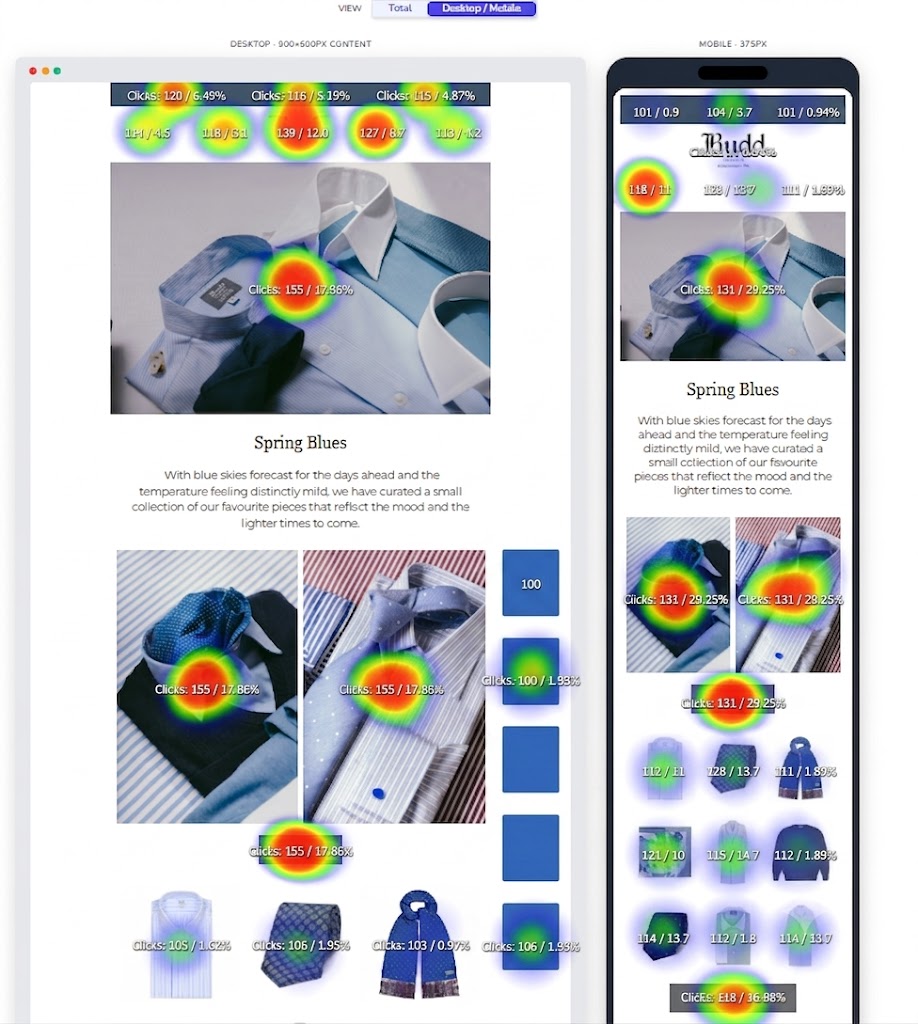
A live device split — the same campaign shown desktop and mobile side by side, each link's clicks split by device.
Why it matters
The same button can be a hero on desktop and a dead zone on mobile. Now you can see it — and fix it.
Mobile vs desktop, side by side
View both heatmaps at once, each framed in its real device, so layout differences jump straight out.
Per-device click share
Every link shows its click count and percentage for each device — no more averaging two audiences into one blurry number.
Spot the mobile dead-zones
Find the CTAs people never reach on a phone, then move them up before your next send.
See your next campaign split by device
Connect your email platform and your most recent campaigns light up — mobile and desktop, side by side.
Start your free 14-day trial →